How to get mouse scroll speed to be normal?

From macOS host to macOS guest, mouse scrolling is so slow it basically doesn't work at all. Is there a setting to fix this ?
-

Hi Bob, Thank you for reaching out to us.
Regarding this issue, are you currently connecting to the host Mac using a Fluid connection?
If not, please switch to our Fluid Remote Desktop by following these steps on your remote machine:- Open Jump Desktop Connect.
- Click on the Settings icon.
- Navigate to the Advanced settings.
- Ensure that 'Fluid Remote Desktop' is checked.
- After checking, a new connection will be created with the label "Fluid Remote Desktop" under the connection name. Please select that connection to establish the connection.
Let me know how it goes.
-

This issue affects me as well. I have seen this reported many times in this forum. I am using a fluid desktop connection. Scrolling with an external mouse scroll wheel is unusable on jump desktop because it scrolls so slow. The same configuration scrolls fine using other Remote Desktop apps so it’s not a hardware issue.
-

Is there a known solution to this? While not unusably slow, I do notice a difference in speed between the native scrolling behavior on MacOS (2014 macbook pro, MacOS Big Sur 11.7.10).
The ideal behavior would be that scrolling speed in MacOS and my remote Windows machine running the Fluid agent would be the same.
-

Hi, I recommend using the app "Mos" to adjust your scroll speed as a workaround for this issue! Happy scrolling, all
https://mos.caldis.me/ -

I believe I actually found the real solution.
When connecting from a Mac to a Mac, Jump Desktop can silently fall back to RDP or VNC. Scrolling when connected via RDP or VNC works fine when using the built in Screen Sharing app, but not when using Jump Desktop.
The way to make Jump Desktop do scrolling correctly isn't just to install Jump Desktop Connect on the host machine, but also to add yourself as a user on the left hand side and sign in.
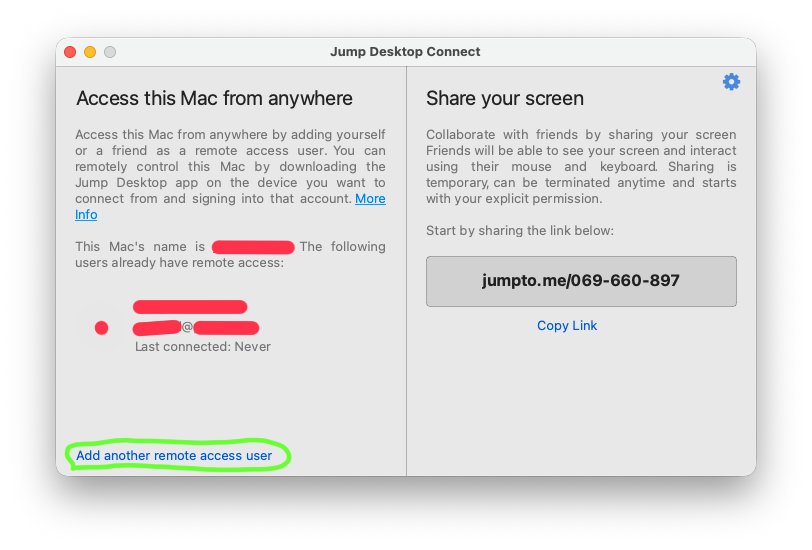
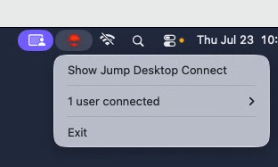
To verify that you are successful, look for the menu bar icon on the host machine to turn red when connected, and show in the list "1 user connected".


Please sign in to leave a comment.
Comments
8 comments