Sending control-C from Windows to Mac?

How do I send control-C when I am using Windows to connect to a Mac? The Ctrl key is mapped to command/apple key on Mac. I need control key for working in Terminal.
-
Official comment

Right Control key works. You can customize the mapping in Jump Desktop -> File -> Preferences -> Keyboard & Mouse -> Keyboard Conversions
Comment actions -

@Jump Desktop Support,
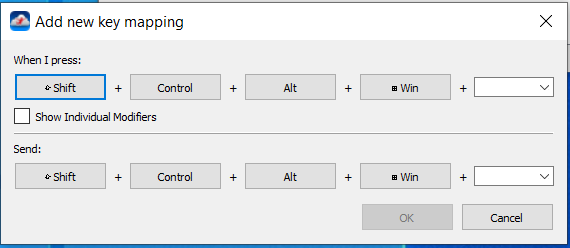
sorry, but this is a real unqualified comment. This is the problem, that defining a Keyboard Conversion is NOT possible.
And the reason is very simple you do NOT offer the favorite CMD Key used for many keyboard shortcuts in macOS.
See screenshot as evidence.
So how should I define a keyboard mapping for macOS when CMD is missing?
-

I realize this is an old thread, but I've read through several other comments on the forum and I haven't found the solution. I want to map my left CTRL to CMD. The default isn't it, CMD is mapped to the WIN key, but when I press the WIN key, my windows start menu pops up and i have to escape that every time. left CTRL to CMD was working previously and in the last month or two, an update seems to have overridden that mapping. CTRL + other keys works as expected, but the CRTL key by itself does not. Any suggestions?
Please sign in to leave a comment.
Comments
5 comments