no answer so i re-write. ipad 14.2 beta ver cannot click desktop on window fluid.

14.2 mouse cursor much more bigger
and i found cannt click windows any jump desktop situation
anything else? answer plz.
-
Official comment

Can you please turn off 'Assistive Touch' in the Settings app? That should fix it.
Comment actions -

This is something that Applied did in iPadOS 14.2. To get rid if the giant cursor:
Settings > Accessibility > Touch > AssistiveTouch > (scroll down and find) > Perform Touch Gestures and DISABLE it.
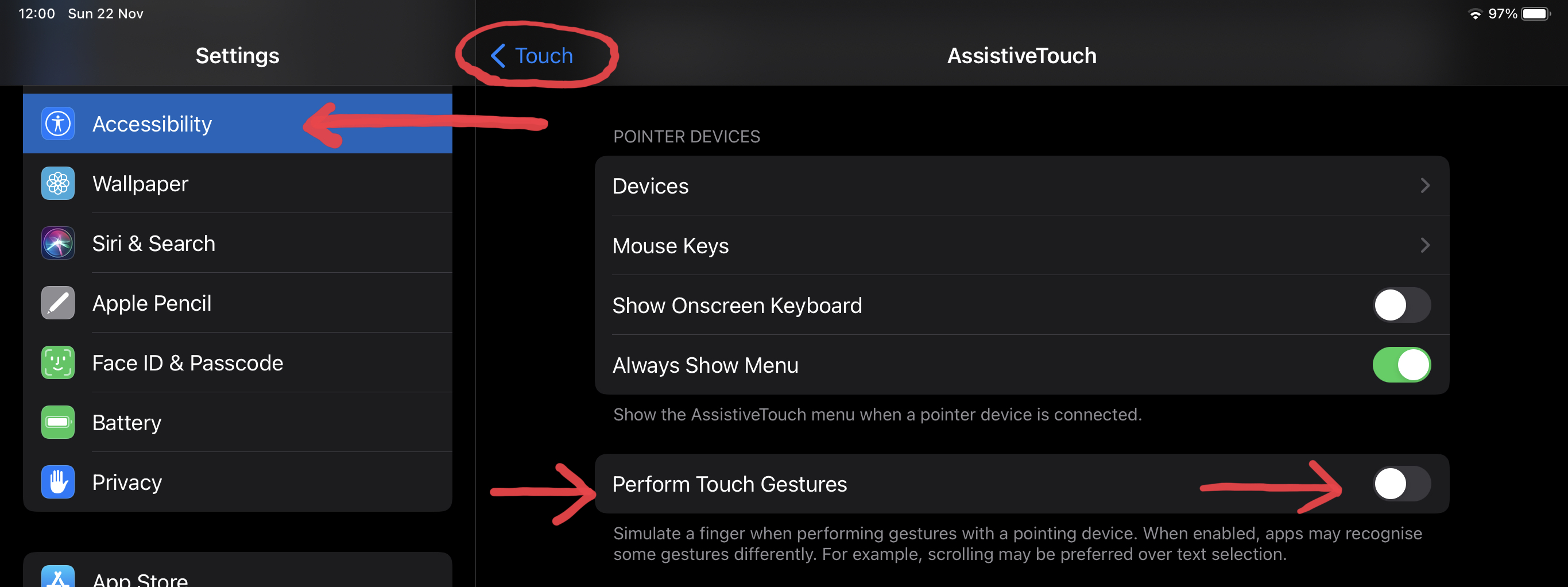
For me, this also resolved the problem where I was unable to left click on anything in a Fluid or RDP session. (I could move the mouse, I could right click), but single/double clicks did not work so long as this giant iPad OS cursor was enabled.
Please sign in to leave a comment.
Comments
2 comments