Pixelated image - mac remote setup

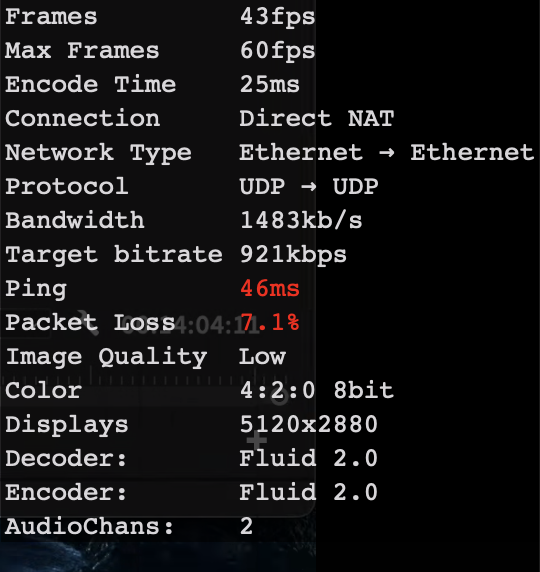
Hello, I am jumping from imac to imac and having pixalation with playback. I have speed tested the internet on both sides and getting around 100mbps upload and download. I have checked the fluid connection status (attached below) and getting some fluctuation. Would anyone be able to decipher what I am reading below and where the bottleneck is coming from?
-

Hi, Thank you for reaching out to us.
Based on the screenshot you shared, it looks like your connection is experiencing both packet loss and high ping times (latency).
These two factors can definitely cause pixelation and playback issues when jumping between iMacs using Jump Desktop.Even if your internet speed tests show fast upload and download speeds (like 100 Mbps), packet loss and latency are much more important when it comes to the quality of a remote desktop session.
Ideally, packet loss should be 0%—even small drops can lead to degraded video quality, lag, or screen artifacts.To help us pinpoint the cause and assist you further, please feel free to email us at support@jumpdesktop.com with your connection logs.
Thanks

Please sign in to leave a comment.
Comments
2 comments