Mac System Settings deactivated by JD

Why does Jump Desktop inactivate all MAC OS settings when it is the active program? This just seems stupid to stop me from MAC OS settings while JD is active. I have to make another program the active application to get to my System Settings. This needs to be fixed.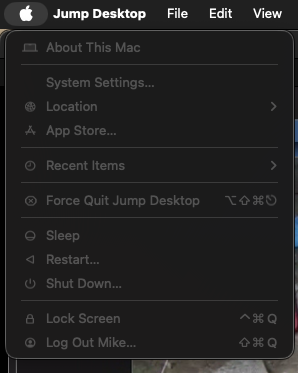
-

Hi, Thank you for reaching out to us.
Jump Desktop should not disable or deactivate your macOS settings when it’s the active program, so this behavior isn’t expected.
As a first step, could you please try restarting your Mac to see if it clears any temporary glitches?
Also, are you running any security or system management apps (like antivirus, firewall, or system protection tools) that might be interfering with macOS settings?
Thanks
Please sign in to leave a comment.
Comments
1 comment