OPTION RIGHT + [ or OPTION RIGHT + { (key problem iPad connects to MacBook)

Hello!
I want to know if someone has this problem or is it a problem with the software itself, I need an answer because if this doesn't work I have to return the application to buy another alternative (like Screens for example)
I use my logitech combo touch keyboard with the iPad.
I have purchased Jump Desktop to manage my Mac using the iPad to program from the iPad with the Mac.
My language is Spanish.
The problem is that I need to use the keys "option + `" = [ and the keys "option + '" = {
The problem is that only when I connect to a Mac and press opt + ` or option + ' it acts as if I am not pressing the option key.
If I connect iPad to Windows then yes all the shortcuts "[ { { ] }" work correctly.
If I use the original Magic Keyboard it seems to work fine, i.e. I use on my iPad the connection from my Mac and run option + ` and it correctly types me [
I have tried on the iPad from General => Keyboard => Physical Keyboard => Switch to several languages (US, Spanish... but I can't find the correct one).
Also within that configuration I have tried in Keyboard Type to change it to ISO and ANSI but I can't find a solution either.
Please could someone tell me why when I connect my iPad to connect remotely to the Mac the option + ` key does not work [?
I leave you a video where you can see the problem better.
https://www.youtube.com/watch?v=fwOlYJdcwOM
Here is another example where you can see that the pencil keyboard mode does work, but I can't use that mode because many keys don't work (up, down and others...)
https://www.youtube.com/watch?v=G9JZ-4NwZOA
UPDATE (I EXPLAIN BETTER)
Hello everyone!
I have taken a lot of time to create this image together with the "Key Codes" software to explain my problem easier.
I am using Jump Desktop (iPad with logitech combo touch keyboard) to access my Macbook M1 with Jump Desktop Connect.
The problem occurs with the "OPTION right" key. If I use the "OPTION left" key together with any symbol (` or ') then it works correctly.
In the following graphic I show:
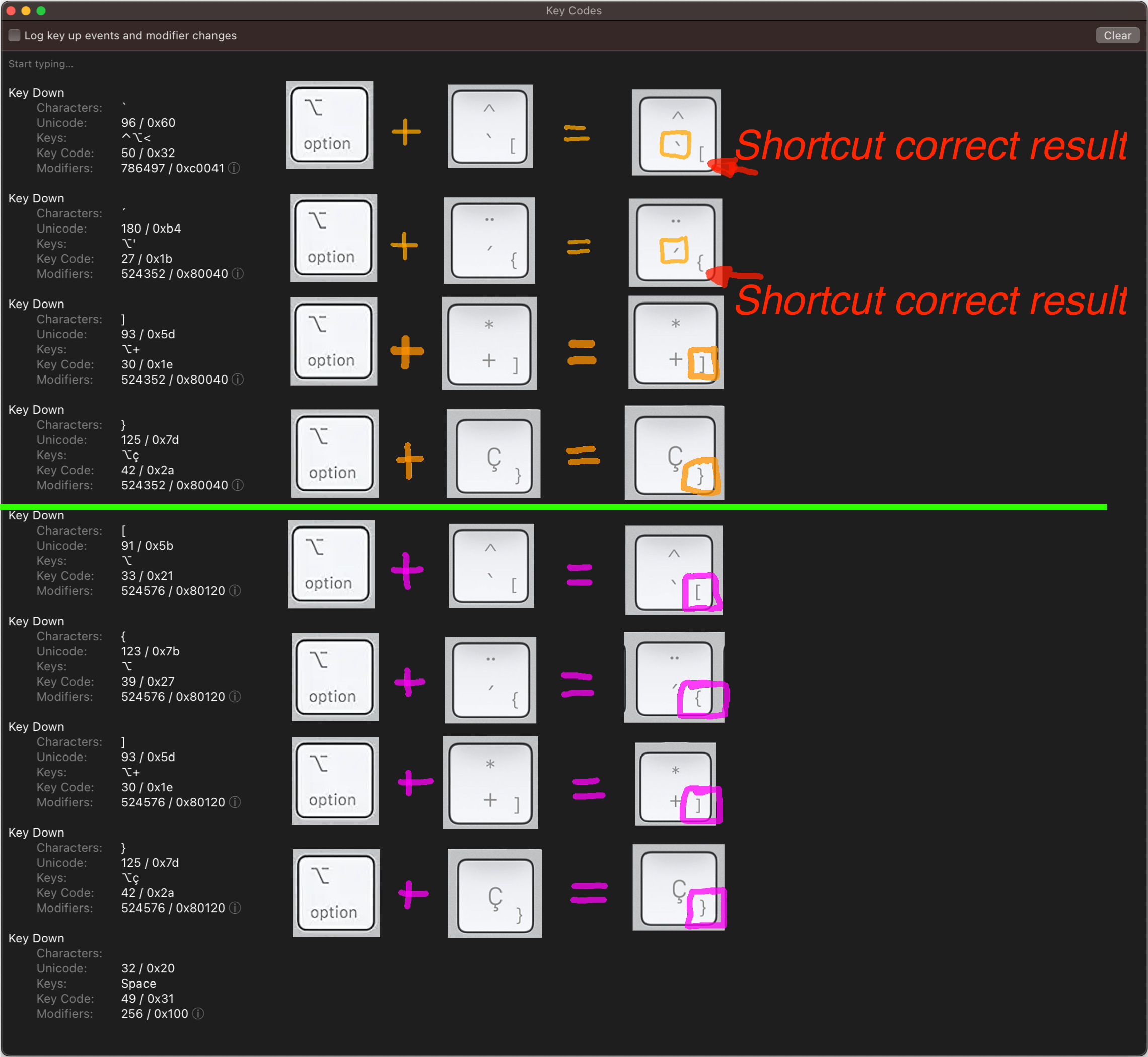
GREEN LINE ABOVE
Set of shortcuts that I press on my iPad with the logitech combo touch keyboard on its OPTION (right key).
ORANGE COLOR
The sum of that set of keys results in the key surrounded by orange.
GREEN LINE BELOW
Set of keys I press (without using Jump Desktop) on my iPad keyboard (logitech combo touch) when I use it directly with my MacBook (in universal control mode).
PINK COLOR
The sum of that set of keys results in the key surrounded by pink color.
IN PINK COLOR EVERYTHING IS CORRECT, SO IT SHOULD WORK ON JUMP DESKTOP :(
Hopefully it will be fixed, I bought the application hoping that someday this will have a solution but it seems that this is not progressing at all :((
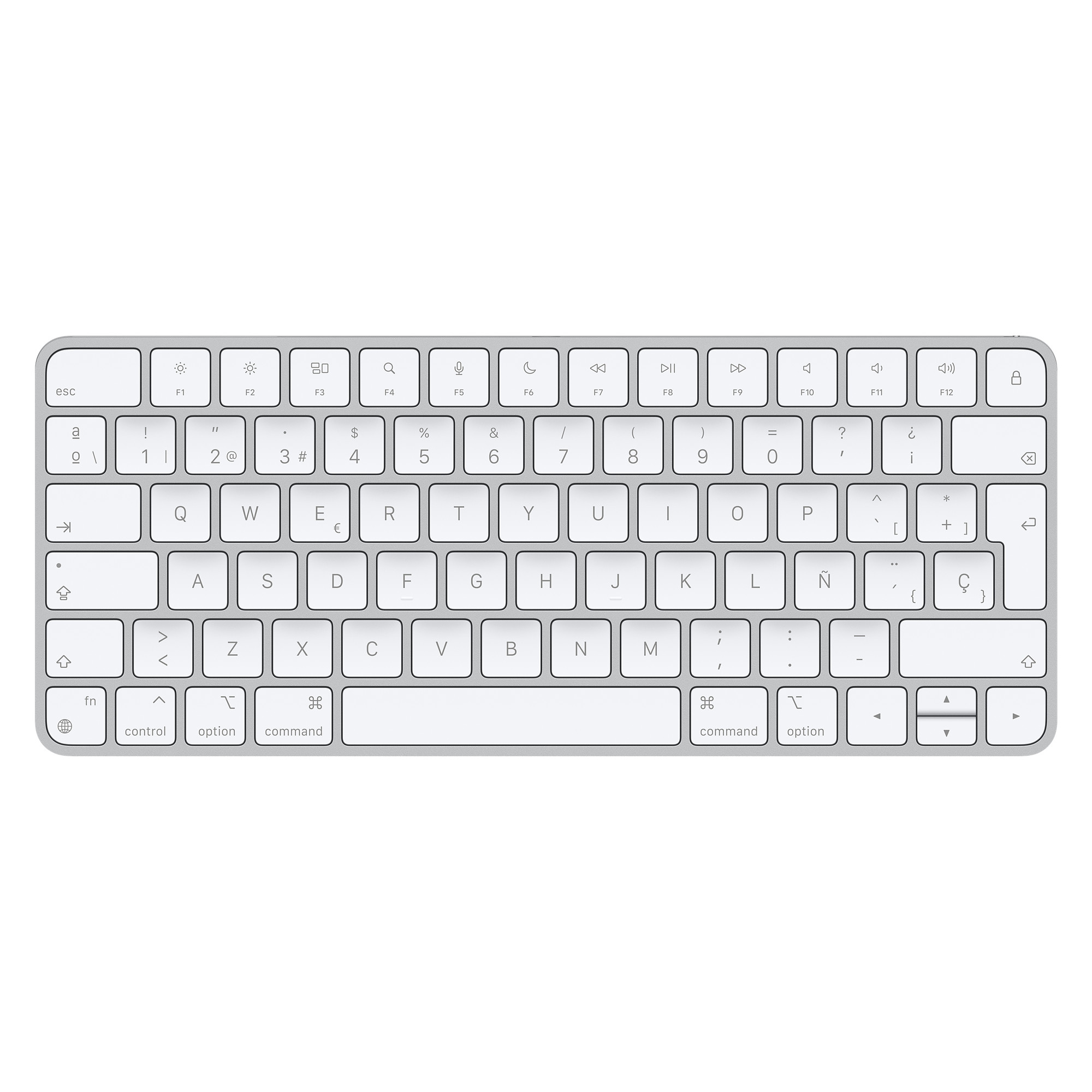
I use ISO SPANISH KEYBOARD:
THANKS AGAIN.
-
Hello everyone!
I have taken a lot of time to create this image together with the "Key Codes" software to explain my problem easier.
I am using Jump Desktop (iPad with logitech combo touch keyboard) to access my Macbook M1 with Jump Desktop Connect.
The problem occurs with the "OPTION right" key. If I use the "OPTION left" key together with any symbol (` or ') then it works correctly.
In the following graphic I show:
GREEN LINE ABOVE
Set of shortcuts that I press on my iPad with the logitech combo touch keyboard on its OPTION (right key).
ORANGE COLOR
The sum of that set of keys results in the key surrounded by orange.GREEN LINE BELOW
Set of keys I press (without using Jump Desktop) on my iPad keyboard (logitech combo touch) when I use it directly with my MacBook (in universal control mode).
PINK COLOR
The sum of that set of keys results in the key surrounded by pink color.
IN PINK COLOR EVERYTHING IS CORRECT, SO IT SHOULD WORK ON JUMP DESKTOP :(Hopefully it will be fixed, I bought the application hoping that someday this will have a solution but it seems that this is not progressing at all :((
THANKS AGAIN.
Please sign in to leave a comment.
Comments
1 comment