services not starting with windows 10

since upgrading to windows 10, whenever the computer reboots it will not autostart the services for jump desktop. i can start them manually and then it loads right up. is there anyway to get the services to autostart on reboot?
-

Hi Josh,
We're currently investigating this. It's supposed to auto-start with Windows but we've noticed that it might time out on users with machines that are slow to boot up. Can you tell me a little more about how long it takes your machine to boot up? Do you have a hard disk or a SSD drive on the machine?
Thanks.
-
Thanks Chico, we're working on this. In the meantime try this workaround steps:
- Click the Windows Start icon on the bottom left and then search for services.msc . There will be one hit "Services". Click to open that.
- When the Service Control Manager opens up, look for the Jump Desktop Connect Service in the list of services and then double click it.
- Set the Startup type to: Automatic (Delayed) and click Apply
- Restart your computer.
- After the restart - it might take 2-4 minutes for your computer to appear online.
Let me know if this helps.
-
Hi,
We think we've fixed this issue in the upcoming Jump Desktop Connect 5.0 release. Among other things, Connect 5.0 also has numerous performance and stability improvements. Would really appreciate if you could try it out and let us know if it fixes the issue completely for you. Here's how you install the beta: https://support.jumpdesktop.com/entries/109741706
-

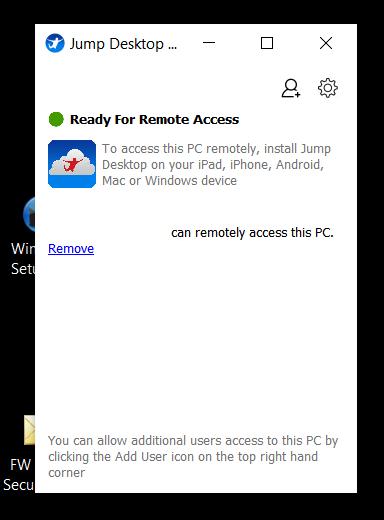
I've attached a picture of what pops up. I am not sure if previous versions popped up but if they did, they minimized themselves to the system tray. The beta version remains maximized on my desktop as shown in the picture.
Jump Desktop Capture.PNG
Please sign in to leave a comment.
Comments
8 comments