Cannot use copy and paste shotcut keys in my iPad

Hi everyone,
I use my iPad to remote control my Windows PC. I also use a physical Bluetooth keyboard with my iPad. I have no problem using copy and paste shortcut keys on my iPad, but for some reason, these keys do not work in Jump Desktop. I have tried different keys on the keyboard but none works.
Is there a way to fix this?
Thank you in advance.
-

Hi, Thank you for reaching out to us.
Regarding this issue, could you please inform me which connection protocol you were using to connect from your iPad to the host(remote) machine? (RDP - Red icon; Fluid - Light blue icon)
If you were connecting via RDP, could you please try switching to Fluid? Here's how:
- Open Jump Desktop Connect on the host (remote) computer.
- Navigate to the Settings icon.
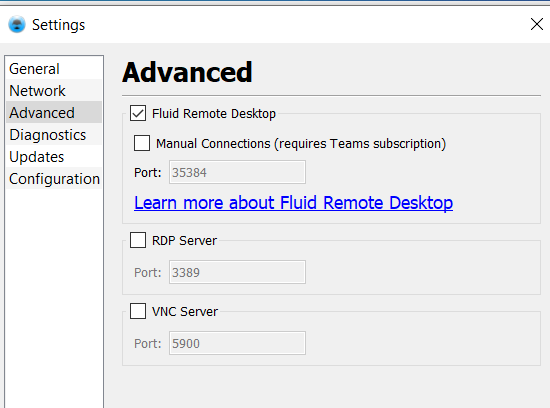
- Go to Advanced settings and ensure 'Fluid Remote Desktop' is checked.
- Once done, a new connection will be created with 'Fluid Remote Desktop' under the connection name. Please click on that to connect.
Let me know if you're still encountering the issue when connected via Fluid.
Thanks
-
Hi,
For us to be more efficient in resolving this issue, please submit a support request and include the Jump logs from your iPad.
Please reproduce the problem and send over your logs by going back to the Jump Desktop main screen and tapping the gear icon on the top Left hand corner, and then tap the contact support button and send the logs over.
Kind Regards,
Abdul Ghani -

Why not answer a simple troubleshootinng request on a public forum Abdul? I've never had issues with Clipboard between a Mac accessing Windows with Fluid connection but all of a sudden it stopped allowing two-way clipboard. Very annoying to not be able to find a quick solution here, havinng to submit a support request to copy/paste feels dumb.
RDP works fine, but Fluid can't. -
Hi Bryan,
It looks like you might be referring to the issue mentioned by another user.
The reason I asked them to submit a support request is because we need to review the logs to understand the problem better. These Jump logs often contain user information, which is why we can't share them here on the community forum.I see that you've also submitted a support request—thank you for that. This will help us address the issue more efficiently.
Best,
Abdul
Please sign in to leave a comment.
Comments
5 comments