Open in Separate Windows not working

Hi Team,
I am attempting to use the Separate Windows feature while connecting from macOS to Windows via Fluid 2.0. Both devices are equipped with dual monitors. However, when I connect, the application opens a single window with both displays in tabs. Is there a way to configure it to use separate windows for each display?
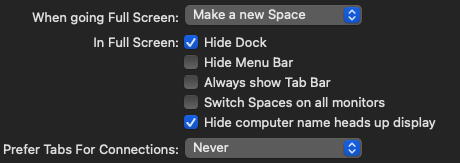
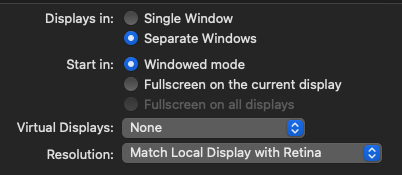
Jump Desktop Version 9.0.89 (90089)
Jump Desktop Connect Version 7.1.40
-

Try deleting the computer from Jump's computer list, and restarting Jump. It should get rid of preferences just for that machine.
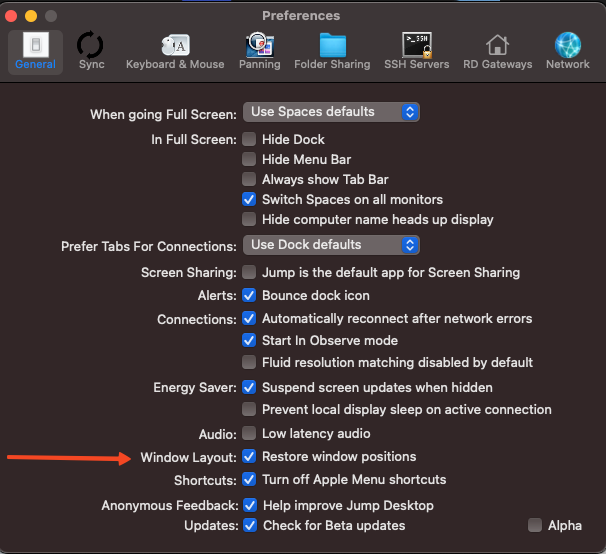
Also, try unchecking this setting to see if that helps. Jump into the computer. Might have to recheck that after. Try the first thing I mentioned first.
-
I have tried deleting, adding new computers, both Fluid and RDP and checking the Restore window positions. No luck with any of them.
I had a previous version of Jump Desktop from SetApp and opens the windows separately as expected.
I might try completely remove the app and computers
-
That might help. I have seen that happen before. There is also a new update. If worse comes to worse, you can try moving the preference files in Home Folder - Library - Preferences to the desktop to the desktop. Then delete it from that preferences folder. com.p5sys.jump.mac.viewer.web.plist
https://jumpdesktop.com/downloads/jdm/JumpDesktopMac-90091.zip
-
When you get a chance, email support@jumpdesktop.com. I think this is a bug.

Please sign in to leave a comment.
Comments
9 comments