Jump Desktop and gaming

Hi JD Support,
I've tried Jump Desktop from my Macbook Air to my Gaming rig Windows 10 - tried playing world of warcraft. The connection is stable and casting spells is no problem, the only problem is the mouse being too fast, it doesn't matter if you use touchpad or mouse. I tried turning down the mouse speed in the game and on my MAC and on my gaming rig windows 10. The screen will spin/rotate very fast if you try to move the camera angle in the game.
------------------------------------
I've tried other games and end up with same problem:
Overwatch
Ark survival evolved
Dayz
------------------------------------
Nothing helps, it feels like you need a option in Jump Desktop to reduce mouse sensitivity.
Addressing this problem would be "the icing on the cake" of this software for me, I allready bought the MacOS version and I'm loving it so far!
I recorded my screen so you can see the problem, see attached link.
-
Official comment

Hi,
Updated: This is fixed in Jump Desktop 10 Beta on iOS, Windows and Mac: https://changelog.jumpdesktop.com/jump-desktop-10-beta-QXilW . 10.x also has hardware acceleration built in - you can turn this on in the 'Codec' menu and switch to a hardware accelerated profile. The experience is excellent when gaming. We'd love to hear your feedback though!
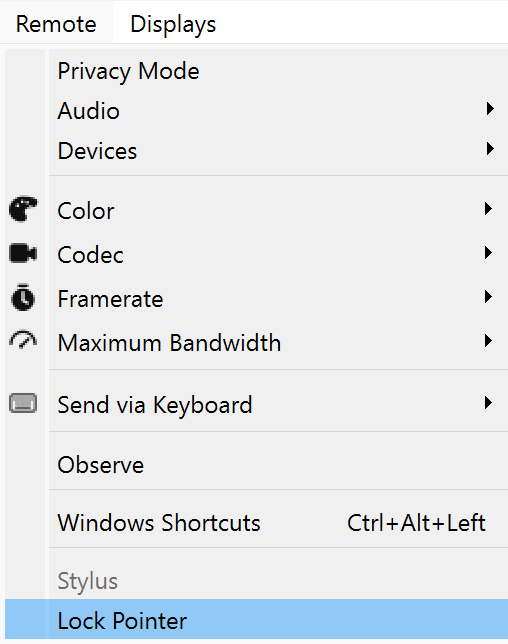
On Mac and Windows: Click Remote -> Lock Mouse Cursor.
On iOS: Switch gesture profile to 'Trackpad (Gaming)' and a physical mouse will work inside games that need relative mouse movement.
Comment actions -
Hi,
This is a because of the way Fluid injects mouse input to the remote machine. This is a known issue with games and certain 3D apps. We're going to fix this soon by adding a new option to control the way the mouse is sent to the remote computer. Please shoot us an email: support@jumpdesktop.com and ask for the Mac beta if you're interested in trying it out.
-

Do you have a similar beta available for iPadOS by any chance?
I LOVE Jump Desktop - I have a large (12 cpu core, 32gb ram) Windows 10 VM in my Citrix Cluster in a local data center, with an Nvidia Quadro card passed through to it (displayport null adapter to keep it happy), and my iPad + Citrix X1 mouse is now my goto desktop device. But was VERY sad to find the mouse support doesn't work with 3d games. Because other than the mouse support, things like WoW, Minecraft, etc work perfectly via Jump Desktop :D
(My primary use case for it is Fusion360, Cura, etc, but gaming from my ipad pro 13" while on the go is just a bonus :D)
-

+1 for a solution for the mouse support while IPAD OS jump desktop. The games run smoothly through the jump desktop app (fluid), but the mouse is unusable in games like overwatch and Call of Duty. Really looking forward a possible fix! This would literally be the best app, especially since Parsec is not available on IOS devices.
-

Same issue, windows tried both v9 and v10 - tested on GTA V Enhanced- when the game is in raw mouse mode it is really bad. Camera spins/flips angles, seems to be better if I move the mouse really slow but completely unplayable. Have tried raw and windows mouse mode setting in game. Have tried all the display types - fullscreen / borderless / windowed / borderless, etc.
Also tried using the lock pointer option - that actually makes the mouse stop working completely.
Any other options to try?
-

Hi,
This should already be fixed in Jump Desktop 10.x.
For games that use raw/relative mouse input, make sure to:
- Enable Gaming Mode
-
Turn on “Lock mouse pointer”
- On iOS/iPad: go to Settings → Mouse & Gestures → Lock mouse pointer
If these aren’t enabled, you’ll typically see the spinning or overly sensitive camera issue.
If the mouse stops working after locking it, something isn’t configured correctly—double-check you’re on 10.x and try again.
Thanks


Please sign in to leave a comment.
Comments
13 comments