Mac to Mac losing sound

Comments

10 comments

  • Avatar
    Jason Bechtel

    I have the same problem. Its like the "jump Desktop Audio" freezes up.
    When I switch Mac OS audio source, to another, and then switch it back, it works again. 
    sometimes this does not work and I have to restart the whole Mac. 

    this still has been happening on version 7.1.44

    0
    Comment actions Permalink
  • Avatar
    Jump Desktop Support

    Hi everyone.

    Which version of MacOS are you on?

    We’re looking into this. The next time this happens, can you please open up a Terminal window on the host Mac and run the following command:

    sudo killall coreaudiod

    This should restore audio.

    0
    Comment actions Permalink
  • Avatar
    Kenneth Kordisch

    Hi. Also what programs that require audio are you using when this happens? How long has the computer been up without a restart?

    0
    Comment actions Permalink
  • Avatar
    Jason Bechtel

    this is Mac OS - Sequoia 15.3.1

    I am using a few. i use Adobe Premiere Pro, Audition, and a media player called "iina". 

    The computer has not been restarted for days at this point, but the time always varies because sometimes it happens within an eight-hour window or it could be longer. It just depends. It's never the same amount of time.

    the command "sudo killall coreaudiod" - did restore audio. thank you

    0
    Comment actions Permalink
  • Avatar
    Kenneth Kordisch

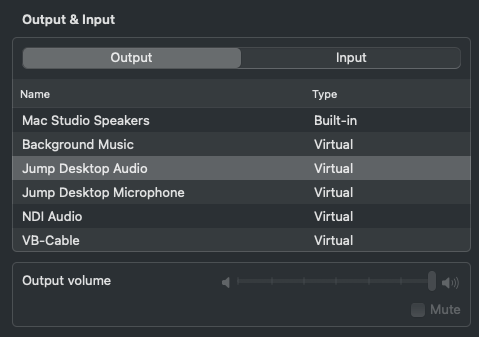
    The next time this happens, before you do the sudo killall command, can you go to system settings, sound, output. Do you see Jump Desktop Audio in there?

    0
    Comment actions Permalink
  • Avatar
    Jason Bechtel

    Yes, I see it there and it's selected. 

    0
    Comment actions Permalink
  • Avatar
    Kenneth Kordisch (Edited )

    Thanks for that. Is there anything specific that you are doing when this happens in these apps?

    Also, are you using VB-Cable at all to route audio while using Jump?

    0
    Comment actions Permalink
  • Avatar
    Jason Bechtel

    no, i have Not been using VB-Cable. 
    This usually happens when I am not using my computer. When I come back to work on it again, I find that it's not working. The audio has still stopped working even after having all those other apps close.

    0
    Comment actions Permalink
  • Avatar
    Jump Desktop Support

    Hi Everyone,

    We are investigating this and are working on a fix.

    0
    Comment actions Permalink
  • Avatar
    Jump Desktop Support

    Hi Everyone,

    We think we might have a fix for this and need help testing this. Jump Desktop Connect 7.1.48 has the fix: https://jumpdesktop.com/downloads/connect/JumpDesktopConnect-7.1.48.dmg .

    Can you please try it out and let us know how it holds? 

    Thanks.

    0
    Comment actions Permalink

Please sign in to leave a comment.