
When connecting to a Mac, but default Jump Desktop Connect will temporarily change your Mac's default audio out device to Jump Desktop Audio while connected. It does this so that audio output from your Mac can be heard remotely. After you disconnect, Jump Desktop Connect will restore your audio output device back to what it was prior to connecting.
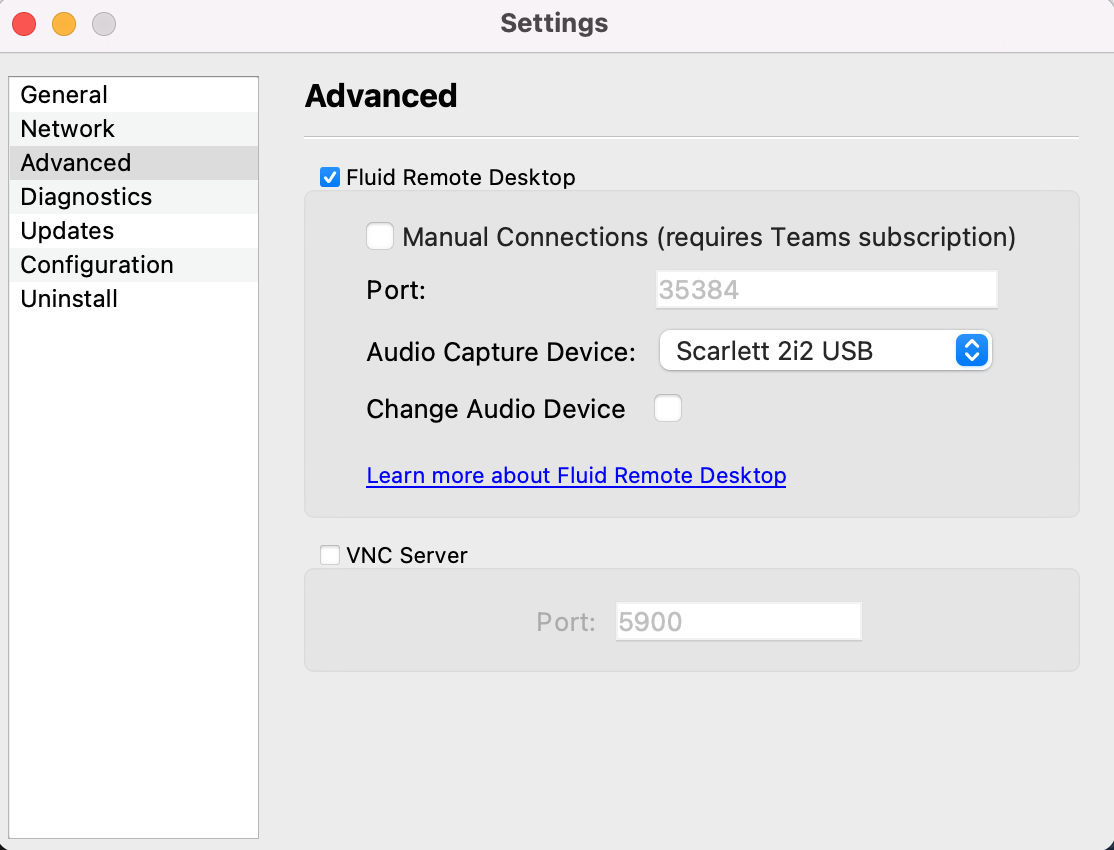
To prevent Jump Desktop Connect from changing your audio output device, open up Jump Desktop Connect on your Mac click the Settings icon -> Advanced and uncheck the Change Audio Device setting in the Fluid section.
Comments
5 comments
This is out of date. There is no Advanced section of the Settings, and the interface has changed.
My settings look nothing like this. Old and out of date?
Jump has been essential for remote tech support for the family. This does not seem to cover Version 9.1.9 (90109). Is there a setting I can access in Jump Preferences for Version 9.1.9 (90109) to prevent the switch to Jump Desktop Audio or to choose our sound outputs and inputs?
FaceTime allows this and we have started using FaceTime only since the demise of Skype.
Regards,
Andy
This is incredibly frustrating. I’ve tried numerous solutions, but I’m considering giving up and requesting a refund. The support team’s information is outdated.
Doesn't work here either. JD 9.1.22. I can deselect the "change audio device" box (and it stays deselected), but that makes no change to the behaviour. The output still changes to JD Audio, and stays there after JD disconnects. If I manually change the output to "<local machine> speakers", it seems to stay on that provided I disconnect JD immediately. But if I (remote client) stay connected, the audio output reverts to JD audio after a few seconds.
Please sign in to leave a comment.