
This article talks about Jump Desktop for iOS's bluetooth keyboard support.
As of Jump Desktop 5.0 physical keyboard support has vastly improved. In 5.0 the physical keyboard works like a regular computer's keyboard. Shortcuts like Alt+Tab or Alt+Cmd just work, arrow keys work, even the Esc key on the physical keyboard now works! You don't need to use work arounds like prior versions of Jump. All keyboard keys and shortcut combinations work.
Win key: When connecting to a Windows machine the Cmd button on the bluetooth keyboard is mapped to the Win key.
Function keys (F1, F2, etc): Apple Bluetooth keyboards have an additional fn key on the bottom left hand corner of the keyboard. Use the fn button in combination with the top row of the keyboard to send function keys like F1, F2 etc to the remote computer.
Macros
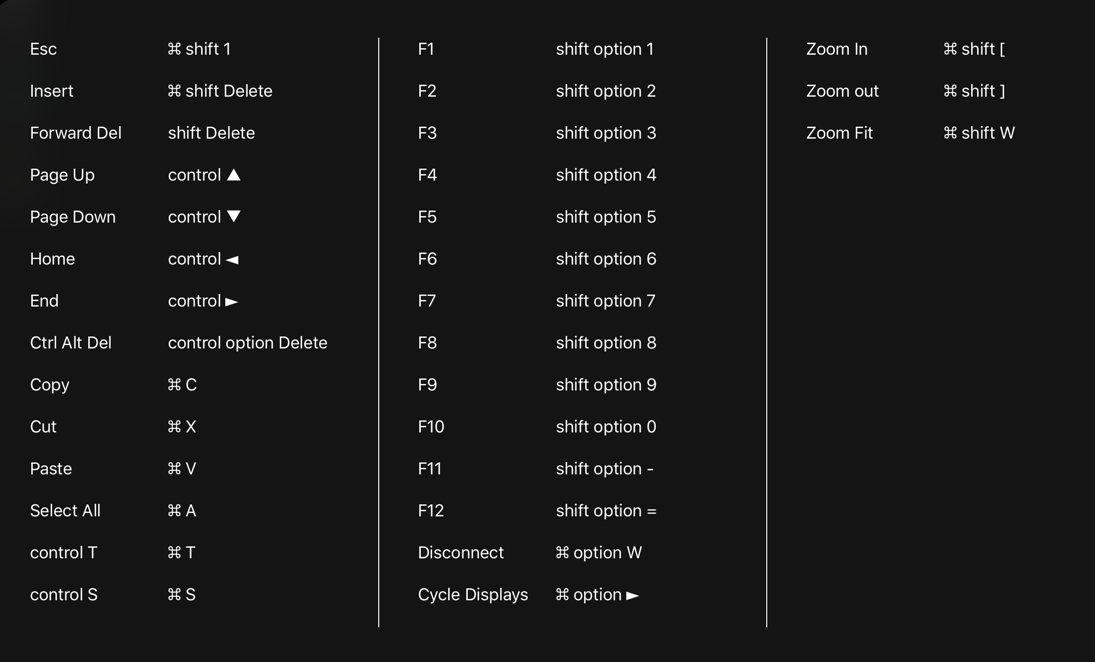
In addition to full bluetooth keyboard support, Jump Desktop also adds macros for compact keyboards which may not include some standard keys. The table below lists all the supported macros. Please be sure to enable macro support by opening up Jump and tapping the settings gear on the top left hand corner of the main Jump screen. Then in the Keyboard section make sure the Macros option is turned ON.
As of Jump Desktop 7.1 for iOS, you can now see the entire list of support Macros by pressing and keeping the Cmd key held while you're connected to a computer. It will show you a sheet of all the macros that are available. Here is a screenshot:
Comments
42 comments
Thank you for developing this app. I just bought it last night and am amazed with its performance.
My question: I am using the Apple Smart Keyboard on an iPad Pro 12.9-inch. I am grateful for how you mapped the Home, End, PgUp, and PgDown keys. However, I cannot get the same version of these combinations while holding the Shift key. I do plenty of programming and to me, having the ability to hit Shift + Home or Shift + End to select an entire line of text is essential. however, if I do this with your app the effect is actually weirdly unpredictable.
Can you please add a fix for this or tell me whether I'm doing something wrong?
Because of this behavior I decided to turn off the Macros option for the moment.
Hi,
I am using smart keyboard and I cannot find a combination for a question mark (?).
Is there any way to type question mark with a smart keyboard?
Thanks
Works with iPad Pro 11 and the Smart Keyboard connected to a remote windows PC ?
Is it possible to disable mapping for shortcuts such as command+c->ctrl+c command+v->ctrl+v. Since I'm using NuoRDS as an RDP server for mac. There's no need to map those keys. The only way I found is to disable macros, but that will cause losing the other convenient key combinations. Please consider adding an option to disable shortcut mapping from command to ctrl (command works fine as a single key). Thanks!
fn key on Apple bluetooth keyboard does not work. { key on Italian keyboard does not work. It is a nightmare for Italian programmers ...
Maybe use function (f1-f12) keys without pressing to fn button? Like default windows machine
Looking for the same thing as @Adel K
Use function (f1-f12) keys without pressing to fn button? Like default windows machine!
Thank you for developing this app.
I am quite satisfied with this app. However, there is one thing that I desperately request to the developer.
I would like to request to make the key mapping feature not a macro function that exists now. Specifically, I would like to ask for cmd and ctrl mapping. Is there any plan to make this feature?
@Woorim Cho if you are talking about turning a cmd key on a mac or ipad to a ctrl key on a pc you are remoting into that option is already available in settings
@Andrew holybee Yes. I meant turning cmd on my ipad to ctrl on my Win pc and ctrl key on my ipad to Win key on my pc. Is it also possible on ipad? It seems possible on mac to Win pc.
Since I think I already tried to check all of the settings on the ipad, can you let me know how to do it?
@Woorim Cho hold down command until a menu comes up there is a search feature and a key and edit options it is somewhat limited compared to the mac where you can do exact key maps but this might do the trick for you but I haven’t played with it much.
I have an iMac with a bluetooth keyboard connected to it. I connect to the iMac with my MBP. So connect is running on the iMac.
When I try to select multiple items on the iMac using the bluetooth keyboard that is connected to the iMac (like I would if not using any remote software) it doesn't work. It will not select multiple items. If I use the MBP keyboard it does work correctly.
I don't have this issue if I use LunaDisplay instead of JumpDesktop, it's as though subsequent mouse clicks are not being sent to the iMac?
I can't see a preference setting that is causing this issue.
Please sign in to leave a comment.